Signed in as:
filler@godaddy.com

Microsoft 365 is designed to balance productivity, collaboration and security. Every organisation has their own business and compliance policies, and Microsoft's default settings may not always align with your organisation's preferred security posture.

Default: Anyone with the link (depending on tenancy configuration) can edit
Risk: Anyone including people outside the organisation with the link can edit.
Recommended Action: Change to sharing to "People in your organisation" or "Specific people". Ask Technology Team to change the default settings for whole organisation.

At Unlock M365, we help organisations strengthen their Microsoft 365 environment through:
✅ Security Assessments
✅ Tenant Hardening
✅ Identity & Access Protection
✅ Governance & Compliance Reviews
✅ Ongoing Security Advisory Services
Security isn't a one-time project—it's an ongoing strategy.
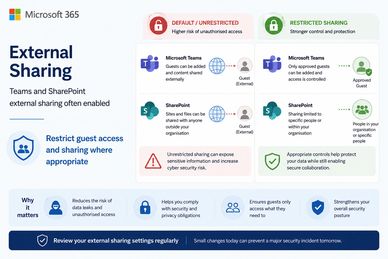
Default: Teams and SharePoint external sharing is often enabled. Guests can be added and content shared externally.
Recommended Action: Depending on organisational policies. Could be Only Approved Guests can be added and access controlled OR Sharing is limited only to people within your organisation.
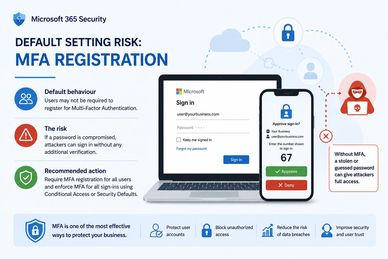
Default: Users may not be required to register for Multi-Faction Authentication.
Risk: If a password is compromised unauthorised login without any additional verification.
Recommended Action: Require MFA registration for all users and enforce MFA for all sign-ins using Conditional Access or other Security Defaults.
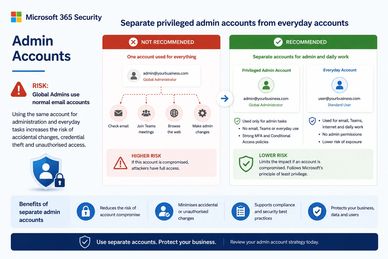
Default: Are system Admins using standard email accounts?
Risk: Using the same account for system admin and everyday tasks increases the risk of accidental changes, credential theft and unauthorised access.
Recommended Change: Use separate accounts for system admin and daily work.
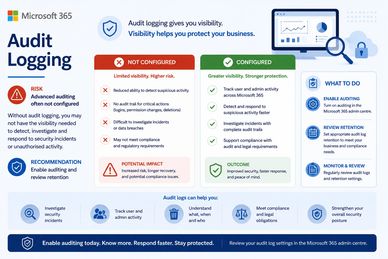
Default: Advanced audit logging may not be configured. May not have the visibility needed to detect, investigate and respond to security incidents or unauthorised activity.
Risk: Increased risk, longer recovery and potential compliance issues.
Recommended Change: Advanced audit logging to track user and admin activity, detect and respond to suspicious activity, investigate incidents with complete audit trails.

We can perform a Microsoft 365 Security Configuration Review to identify common risks, compare your tenancy against recommended practices, and provide practical guidance for your technology team.