SharePoint Alerts End July 2026 - Simple Alerts Replaced by SharePoint Rules

  • Home
  • About Us
  • Resources
  • Service Products
  • Case Studies
  • Privacy Policy
  • More
    • Home
    • About Us
    • Resources
    • Service Products
    • Case Studies
    • Privacy Policy
  • Sign In
  • Create Account

  • My Account
  • Signed in as:

  • filler@godaddy.com


  • My Account
  • Sign out

Signed in as:

filler@godaddy.com

  • Home
  • About Us
  • Resources
  • Service Products
  • Case Studies
  • Privacy Policy

Account

  • My Account
  • Sign out

  • Sign In
  • My Account

Emailing documents instead of sharing them?

Every time you attach a file to an email, you’re creating multiple instances of the same file

Still emailing documents directly to your leader instead of sharing them?
Every time you attach a file, you’re quietly creating multiple instances of the same document across inboxes and OneDrive.
Meanwhile, Microsoft 365 already lets you:
✔ Keep one file
✔ Track every change
✔ Collaborate in real time
Sharing a file from your OneDrive is easy to do
✅OneDrive > Right click file > Share  > Settings  >  People you choose > Edit > click Apply > Type in Name > Type in message > Click Send 

OneDrive File Share Training Video

🎯  Are you still emailing documents as attachments instead of sharing them? Do you prefer order or duplication?

In less than 2 minutes, we’ll cover:

✅ Shared OneDrive file versus Emailing Attached Files
✅ How to Securely Share OneDrive Files
✅ How to avoid sharing "Anyone with the link"
✅ Achieve Order with Single Source of the Truth

✅ Avoid the confusion of file duplication

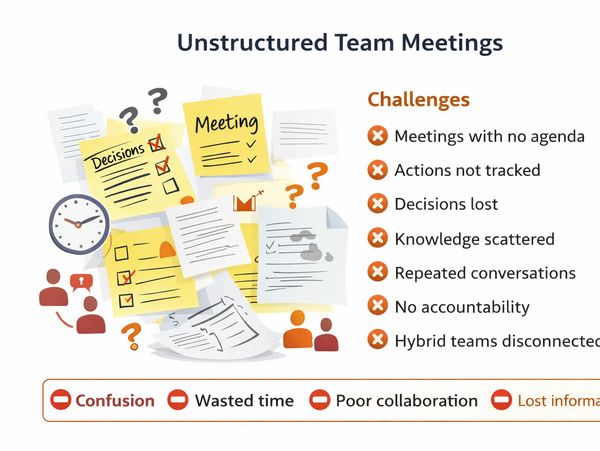
How Effective are your Team Meetings?

Challenge - Unstructured Team Meetings

When meetings lack structure, decisions get lost, actions aren’t tracked, conversations repeat, accountability drops, and knowledge ends up being scattered everywhere.

Contact Unlock m365

Solution - Unlock the full power of OneNote in Teams

Unlock OneNote in your Teams channel to create accountability, collaboration, and transparency together and making it easy for everyone to stay aligned.
Ideal for onboarding new team members and building shared understanding from day one.

Learn More

Is your M365 Default Sharing Setting with Anyone?

The Microsoft 365 default “anyone with the link” sharing creates a hidden security risk.

During Jan-June 2025 37% of Australian reported data breaches were caused by human error.  It could be as simple as emailing information to the wrong person.


For Microsoft 365, one of the biggest risks may be the default setting:  “Anyone with the link” sharing


Unless an IT Admin changes it, your files may be accessed by anyone with the link.

🔒 A better organisational default setting may be to change the file sharing  default to be: specific people only OR only people in your organisation.

Introduction to AI Copilot Micro Video

🎯 What You’ll Learn

In just 3 minutes, we’ll cover:

✅ What M365 Copilot is (and what it isn’t)
✅ Australian organisational privacy considerations
✅ What data must never be used with Copilot
✅ Why AI responses always need to be checked

Free Unlock M365 Micro Classes

Learn how to use Microsoft 365 Copilot safely, effectively, and confidently at work.

🎯 What You’ll Learn

In just 30 minutes, we’ll cover:

✅ What M365 Copilot is (and what it isn’t)
✅ Australian organisational privacy considerations
✅ What data must never be used with Copilot
✅ Why AI responses always need to be checked
✅ Common AI mistakes and “confidently wrong” answers


 👩‍🏫 Presenter - Jodie Wardle
Founder – Unlock M365

Jodie has been using AI tools extensively since 2024 and brings real‑world, hands‑on experience to this session. Based on extensive use, Jodie estimates AI responses are around 80% correct,  making human validation critical. Jodie has spent the last 12 months in a cyber security government role as a consultant/analyst.

Book Free Micro-Class

Unlock MS Teams Masterclass

Discover how to structure your Team Channel using Microsoft 365 resources in less than 60 minutes 

Click Here to Book

Connect With Us

Copyright © 2026 Unlock M365 - All Rights Reserved.

  • Home
  • About Us
  • Resources
  • Service Products
  • Case Studies
  • Privacy Policy

Free Unlock M365 Online Classes July 2026

What are you using in M365 today, and what’s getting in your way? Most organisations have Microsoft 365. Few are using it in a way that greatly improves how work gets done. In 30-60 minutes you can change that.

Click Here to book

This website uses cookies.

We use cookies to analyze website traffic and optimize your website experience. By accepting our use of cookies, your data will be aggregated with all other user data.

DeclineAccept